 Peter Founder
A Rarely Mentioned but Effective Traffic Source (Part 4)
OctoClick
Hi, I’m Peter.
In 2018 I wrote a small series called “A Rarely Mentioned but Effective Traffic Platform,” which introduced three traffic sources that few people were using at the time but that ran well.
The series stopped for a few years. Today I’m picking it back up with Part 4.
The thing people running offers fear most is a channel whose data finally stabilizes, and then the volume stalls or the traffic suddenly goes wrong. Testing one more source means keeping one more path open.
The star of this issue is OctoClick: what it is, how to test it on a small budget, and how to scale once it works.
01 What OctoClick Is
OctoClick is an ad network whose traffic comes directly from more than 10,000 publisher sites, reportedly with over 100 million impressions a day across more than 120 GEOs.
The ad formats are mainly In-Page Push, Native and Popunder, plus video: VAST In-Stream, Out-Stream and Video Pop-Up.
You can buy on CPC or CPM, and the minimum deposit is $20. Every advertiser gets an account manager regardless of budget size, and the platform also runs its own anti-fraud.
When I test a new source, the first thing I check is whether the GEO I want to run has volume and roughly what it costs. OctoClick’s dashboard has a Traffic volume page that lists impressions, unique visitors and average CPM by country for the past 24 hours, and you can split it by mobile and desktop.
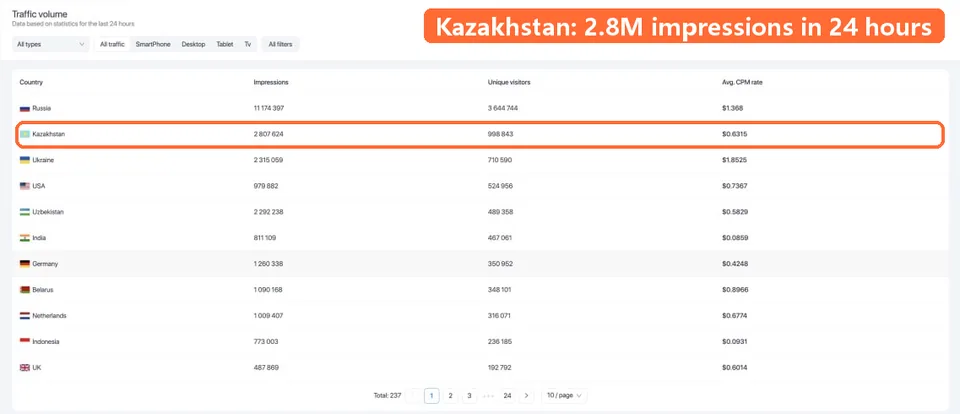
Traffic volume
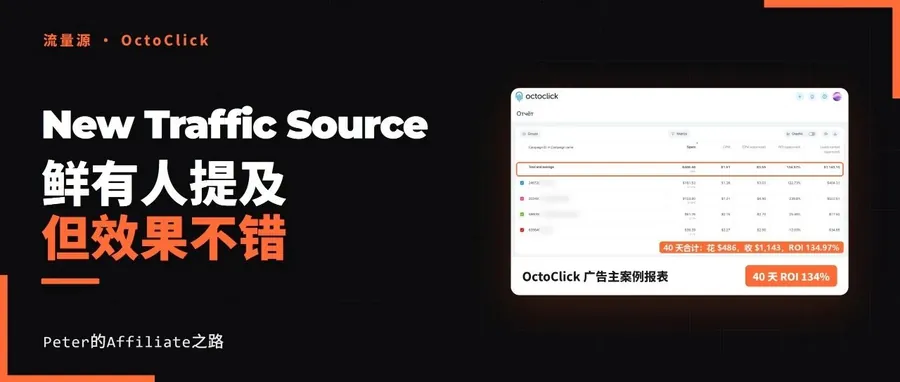
02 Media Buyer Case: KZ Popunder, 134% ROI in 40 Days
The case below was shared by Daniel, an OctoClick advertiser.
| Metric | Data |
|---|---|
| 40-day spend | $486 |
| Revenue | $1,143 |
| Net profit | $657 |
| ROI | 134% |
| Metric | Data |
|---|---|
| Offer | MVAS subscription, paid per lead (CPL) |
| GEO | Kazakhstan, Android and iOS users on the Tele2 carrier |
| Traffic | OctoClick Popunder |
| Period | April 21 to May 31, 2026, 40 days |
The case comes from OctoClick (July 9, 2026, by Daniel Inyang), and this article is published with OctoClick’s authorization.
He started with just two Popunder campaigns, one for Android and one for iOS. Each was paused once it had spent $5 so he could go back and optimize; the hourly budget was capped at $1, letting it run slowly for a few hours to build up enough data before he looked.
03 Optimizing Once the Data Comes In
He reads the data by site ID, meaning the specific publisher site:
A site ID that has spent more than the payout of 3 leads without turning a profit gets blacklisted.
Some site IDs do well on Android and badly on iOS, and some are the other way around.
For a site ID that converts but still has negative ROI, he doesn’t rush to blacklist it. He lowers the bid first and watches for a few more days. One round of this optimization takes 2 to 3 days, depending on the offer’s payout and category.
The report after 40 days:
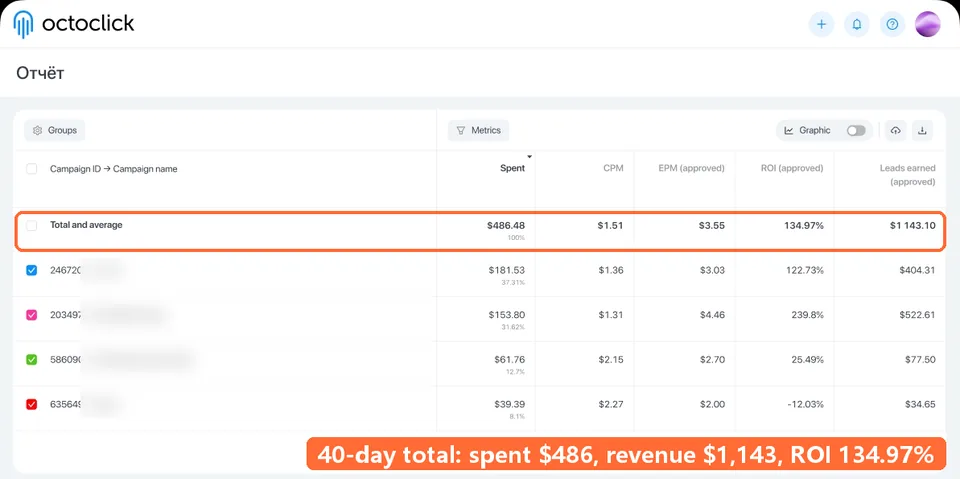
OctoClick report
He also made one more point: conversion rates differ a lot by hour of the day and day of the week. A site ID that is bad today may make money tomorrow, and even within the same day a different time slot can change the result. Blacklist only once you have enough data.
He didn’t use a third-party tracker. He only asked his account manager to set up the postback, and relied entirely on OctoClick’s built-in reports for the rest.
For scaling, these are the features in the dashboard you can use:
| Feature | What it does |
|---|---|
| Conditional bidding | Set a separate price for a targeting condition, such as a certain hour of the week; set it to 0 for what you don't want to buy |
| Frequency | Controls how many times the same person sees your ad within a few minutes, hours or a day |
| S2S Postback | Sends conversions and revenue back to the platform, so you can cash them in one place |
| Bids and excluded placements | Raise bids on what works, exclude what doesn't |
04 New Feature: Bringing Back People Who Already Visited
This is a recent OctoClick feature: Retargeting, marked NEW in the left-hand menu of the dashboard.
What it does is show ads only to people who have already shown interest in your product, for example those who added to cart but didn’t pay, or stayed on a page for a long time without leaving their details. Conversely, you can also exclude that group so they no longer see your ads.
An example: you’re running a subscription offer, and a user clicks the ad, lands on the page, looks around and leaves without subscribing. Put the code on your landing page so everyone who visits it is recorded in an audience, and exclude those who already subscribed. Then create another campaign that targets only this audience, with a different set of creatives, to chase them once more.
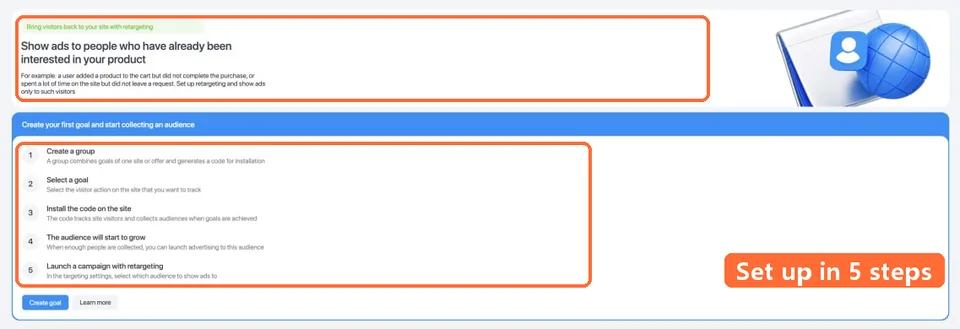
Retargeting setup
The setup takes 5 steps:
- Create a group, one per website or offer, and the system gives you a piece of code
- Choose a goal, meaning which action by the visitor to record
- Install the code on your website, and visitors who take that action join the audience
- Wait for the audience to build up
- Create a new campaign and pick this audience in the targeting
05 My Take
Two things I agree with in this case: test a new source on a small budget first, and don’t rush to blacklist a site ID, but lower the bid and watch for a few more days. He gave each campaign $5 based on his own offer; when you test yourself, set the amount according to your own offer’s payout. Run a little money to get data first, then decide whether to add more.
I’d use Retargeting on my own landing pages first: people who looked but didn’t convert are exactly the group most worth chasing once more.
If you want to try it, here is how to start:
- Sign up with this OctoClick sign-up link, then enter the promo code OCTOAFF when you top up for a 10% bonus, minimum deposit $20
- Send your account manager the GEO and offer type you want to run
- Have your account manager check the volume and plan the first round of tests
New articles and quick notes from Peter.