 Peter Founder
Cloudflare Workers: A Custom Ad Optimization Tool for $5 a Month
Cloudflare Workers
Hi, I’m Peter.
The bill first.

Cloudflare invoices for the last few months
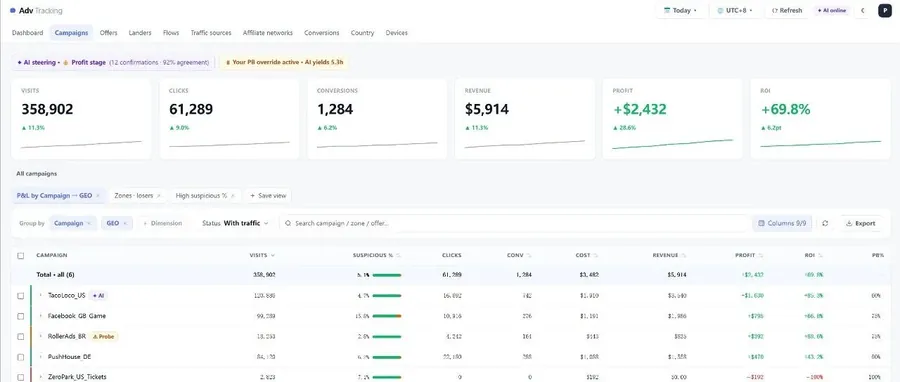
What those few dollars a month run is Polaris, my custom ad optimization tool: data comes in, it adjusts automatically by my rules, the console shows the results, plus a few dozen scheduled jobs keep watch overnight for me.
It used to live on Vercel; this year I moved it to Cloudflare Workers, and it got a lot cheaper.
Some of you want to build your own Tool with AI but get stuck on one thing: where to run it, whether the free tier is enough, whether to buy a server, and so on.
My answer: the $5 plan on Cloudflare Workers is the best setup for Vibe Coding.
01 What is Cloudflare Workers?
The program you’ve written needs somewhere that stays switched on to run it. That place used to be called a server: you had to buy it, set it up and babysit it.
Workers removes that step: upload the code, and Cloudflare’s several hundred nodes around the world run it for you; whoever visits gets served at the node closest to them.
No machine to buy, no OS to install, no getting up in the middle of the night to restart. Upload the program and you have a URL. Billing is by number of requests; if nobody visits, it costs nothing.
Especially combined with an Agent’s computer use, you don’t even have to open the dashboard to complete a whole series of deployments.
02 Four plans side by side
The two everyone uses most: Cloudflare and Vercel.
Each has a free tier and a paid tier; I’ve put all four together:
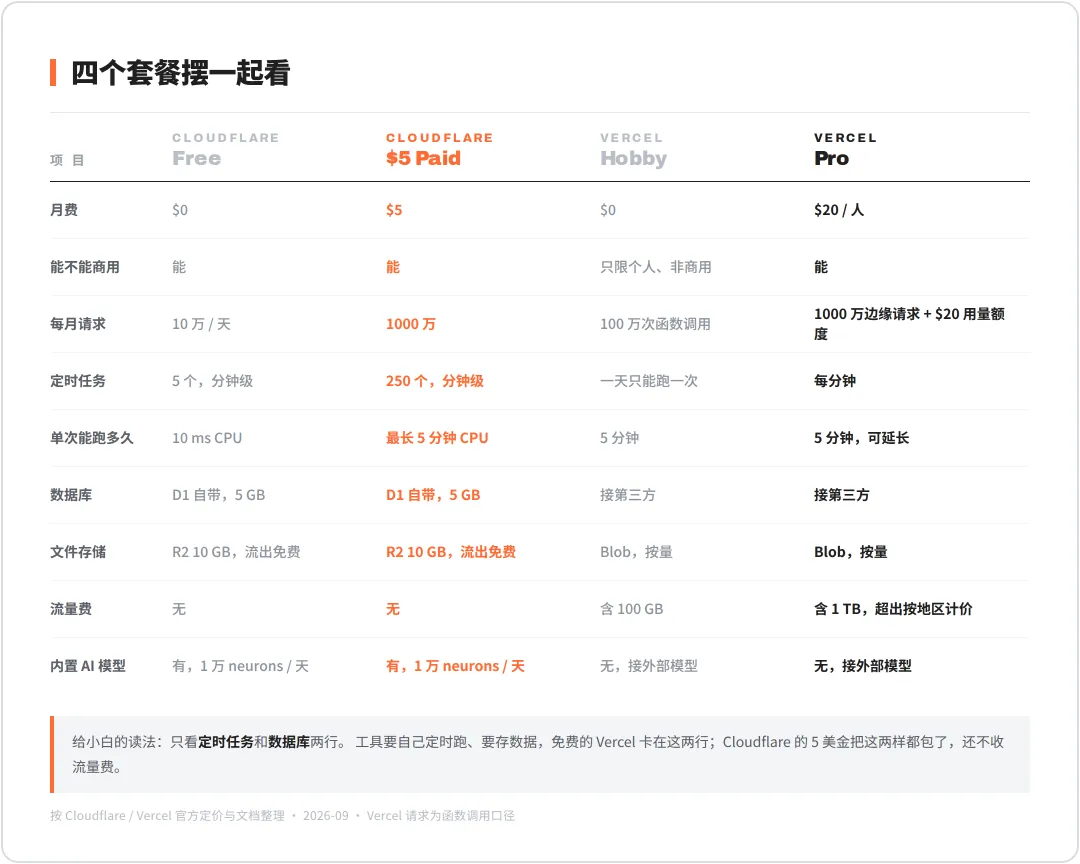
Cloudflare vs Vercel: the four plans compared
To get started, the free tier is enough, or just look at the two rows below.
Cron jobs: a tool has to run on its own schedule. Vercel’s free tier can only run once a day; minute-level needs Pro, from $20.
Cloudflare’s free tier has 5 minute-level crons; $5 gives you 250.
Database: a tool has to store data. Cloudflare comes with D1, 5 GB, on both the free and the paid tier.
Vercel needs a separate third party, for example the Upstash I used before.
This is my account’s plan:
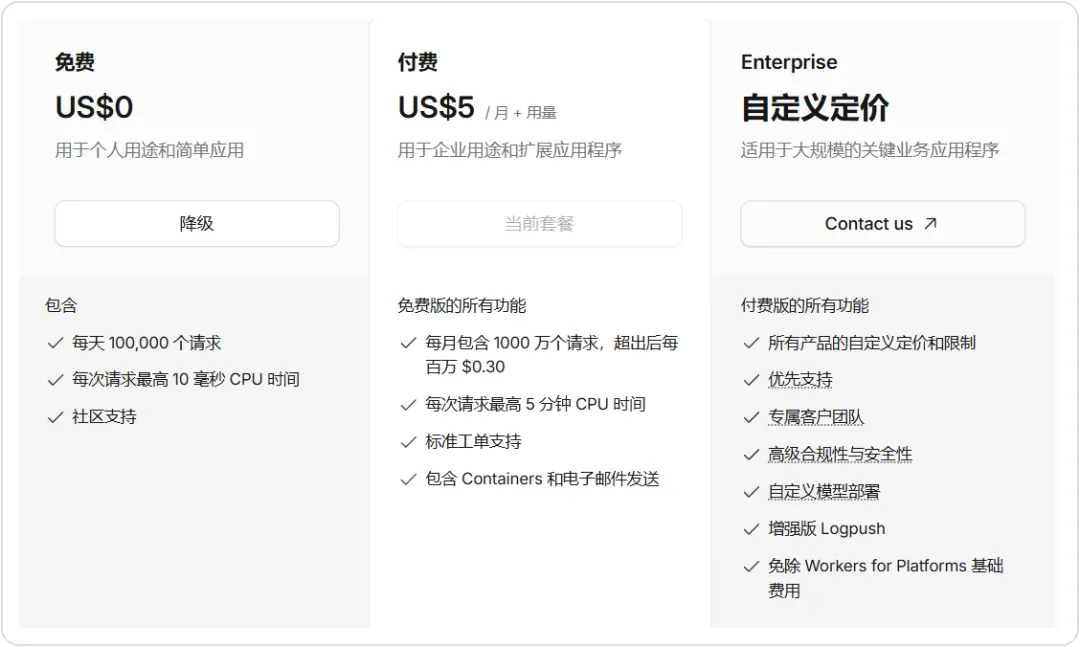
Workers plan: US$5 / month
03 What $5 actually gets you
A full list, all of it things I’m using:
Host a web page or a tool: static pages are free and unlimited, backend requests 10 million per month.
Receive webhooks and postbacks: the network’s postback, the ad platform’s notifications, give them a URL and they’re connected.
Run scheduled jobs: 250 cron triggers, as often as once a minute, each run up to 5 minutes.
Store data: D1 database, 5 GB, 25 billion row reads and 50 million row writes per month.
Store files: R2 object storage, 10 GB, no egress fees on downloads.
Run AI models: Workers AI gives 10,000 neurons a day free, enough for small models doing classification and tagging.
Quotas mean nothing in the abstract, so look at my bill details.
Last cycle: 480,000 requests, 14 of the 15 billable items read $0.00, and only Durable Objects requests went slightly over, 15 cents:
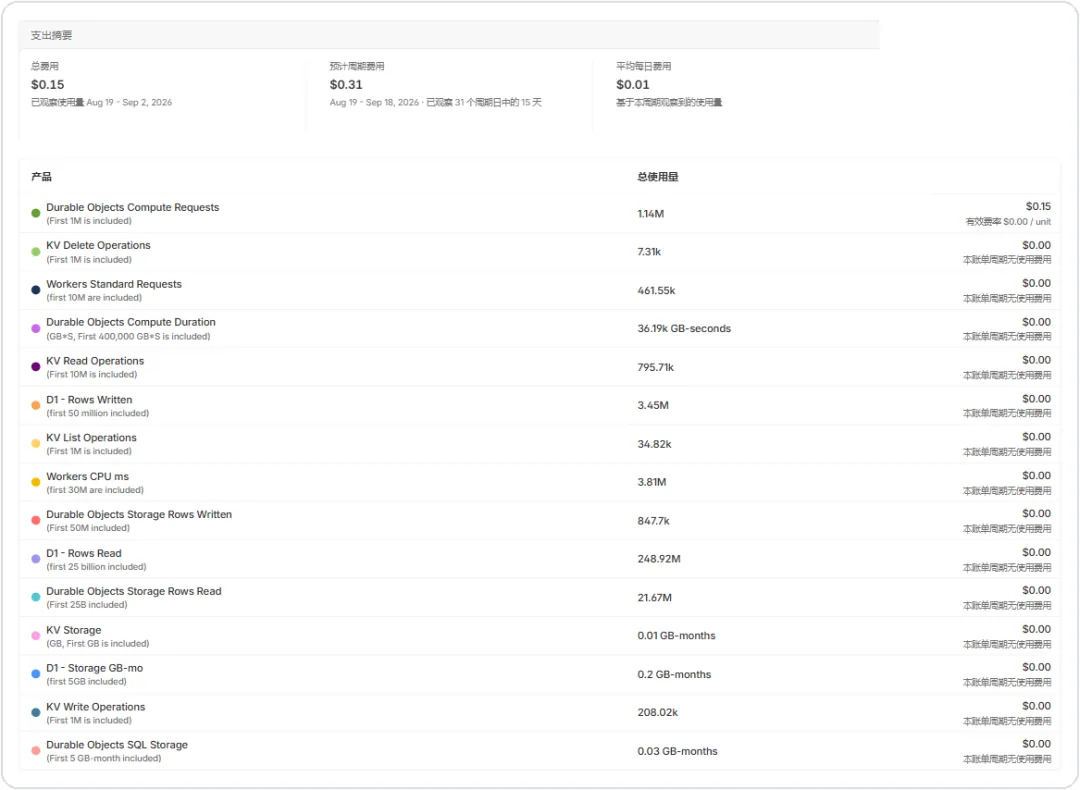
Billable usage this cycle: total $0.15
D1: 250 million row reads, 3.48 million row writes, 462 MB of storage, all within the $5 too.
This is what I mean by the best setup: $5 covers everything a small system needs, anything beyond is billed separately, and the overage is counted in cents.
04 The three things to build from 0 to 1
The honest truth first: the three pages below, I’ve never clicked through myself, not once.
Polaris, from creating the database to going live, was all done by CC (Claude Code): it creates the resources from the command line, gets it working locally, deploys, and then uses computer use to open the dashboard and verify for me.
The first thing, a Worker: in the top right of the Workers & Pages page, Create application. Five entry points: connect GitHub, connect GitLab, start from Hello World, choose a template, upload static files.
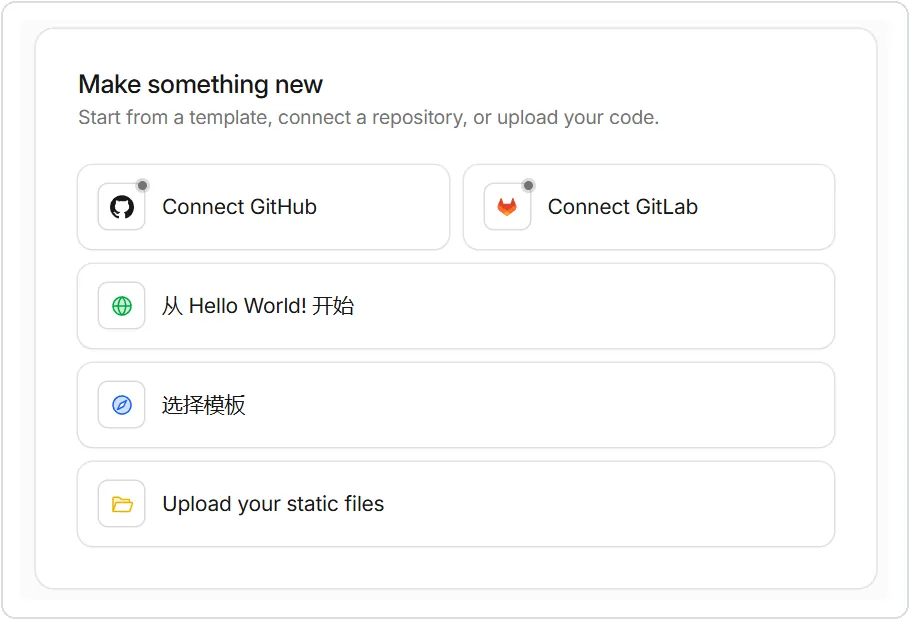
The create entry in the dashboard
Go in through Hello World and the simplest code is already written; give it a name, click deploy, and a URL is live. The command:
npx wrangler deploy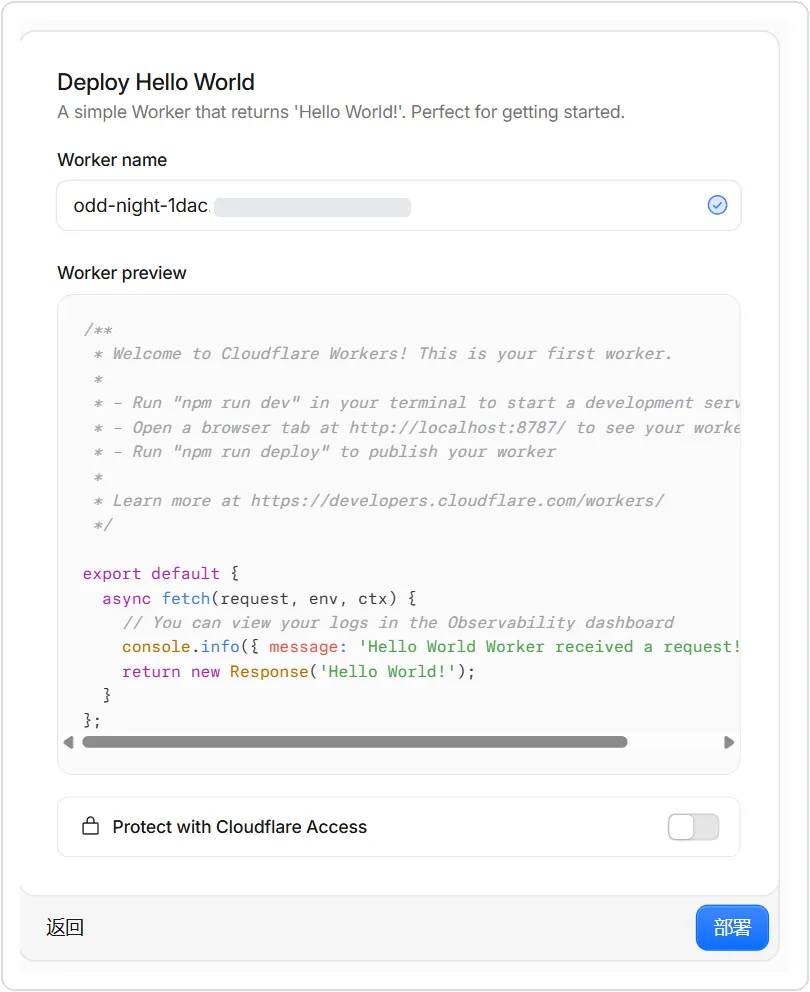
The Hello World deploy page in the dashboard
The second thing, a database: left menu, Storage & Databases, D1, Create database. Name it, choose automatic location, create. The command:
npx wrangler d1 create polaris-db
The D1 create page
The third thing, scheduled jobs: go into the Worker, Settings, Triggers, Add Cron.
CC writes one line of crons in the config file, and it’s attached automatically on deploy. The screenshot of Polaris’s triggers below is the one it wrote.
With those three, you have a shell that can store data and run on a schedule. Putting ideas into the shell is also the Agent’s job, but the direction has to be yours.
05 Polaris: how the Agent and I built it
Polaris is the optimization tool I wrote for myself. First how it works, then how it gets a whole series of tasks done on CF Workers.
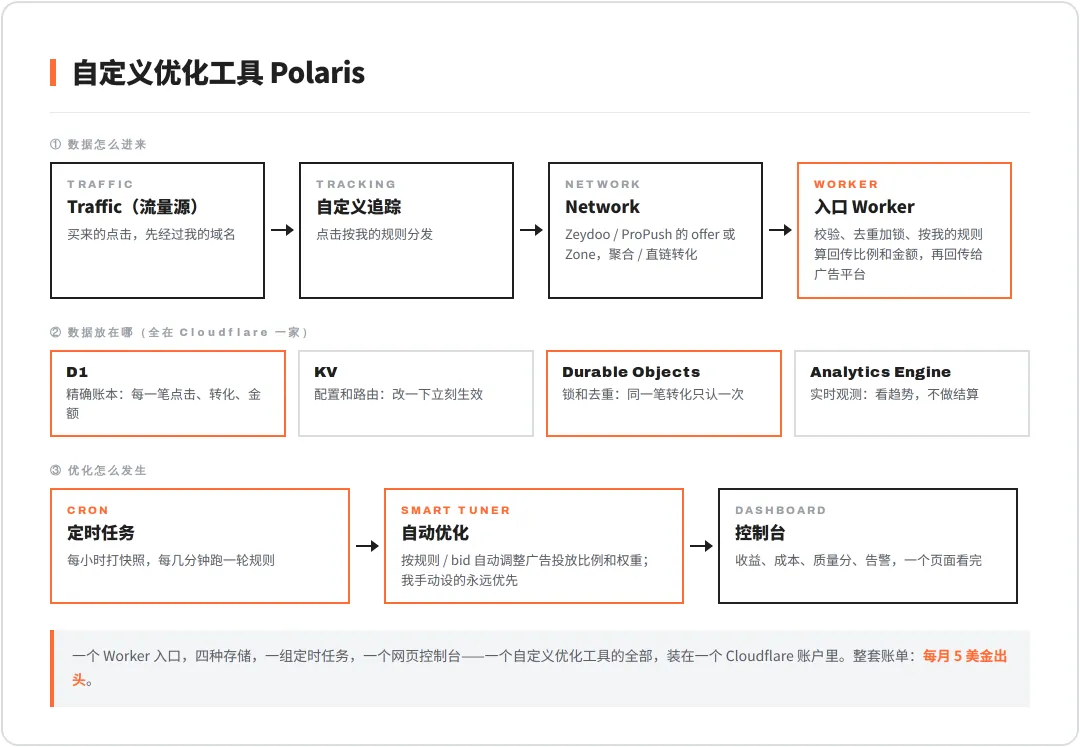
Polaris’s structure on Workers
How data comes in: clicks from the traffic source → my custom tracker distributes them → the Network (Zeydoo or ProPush) produces the conversion, via aggregator or direct link → the postback hits my Worker.
The Worker does four things: validate, deduplicate and lock, compute the postback ratio and amount by my rules, and post back to the ad platform. This is the money path; not one entry can be wrong.
Where the data lives: four kinds of storage, each with its own job. D1 is the exact ledger, KV holds config and routing, Durable Objects handle locks and dedup, Analytics Engine only watches trends and never settles anything.
How optimization happens: cron jobs take snapshots and run the rules; the Smart Tuner adjusts delivery ratios and weights automatically by rule and bid, and anything I set by hand always takes priority; then the console shows revenue, cost and quality score.
This is the Workers list in my dashboard; the first entry is Polaris, with 129 routes attached:

The Workers list
Scheduled jobs are the core of the whole system. Every minute, every 15 minutes, on the hour, staggered: a few dozen cron triggers hang off one Worker:
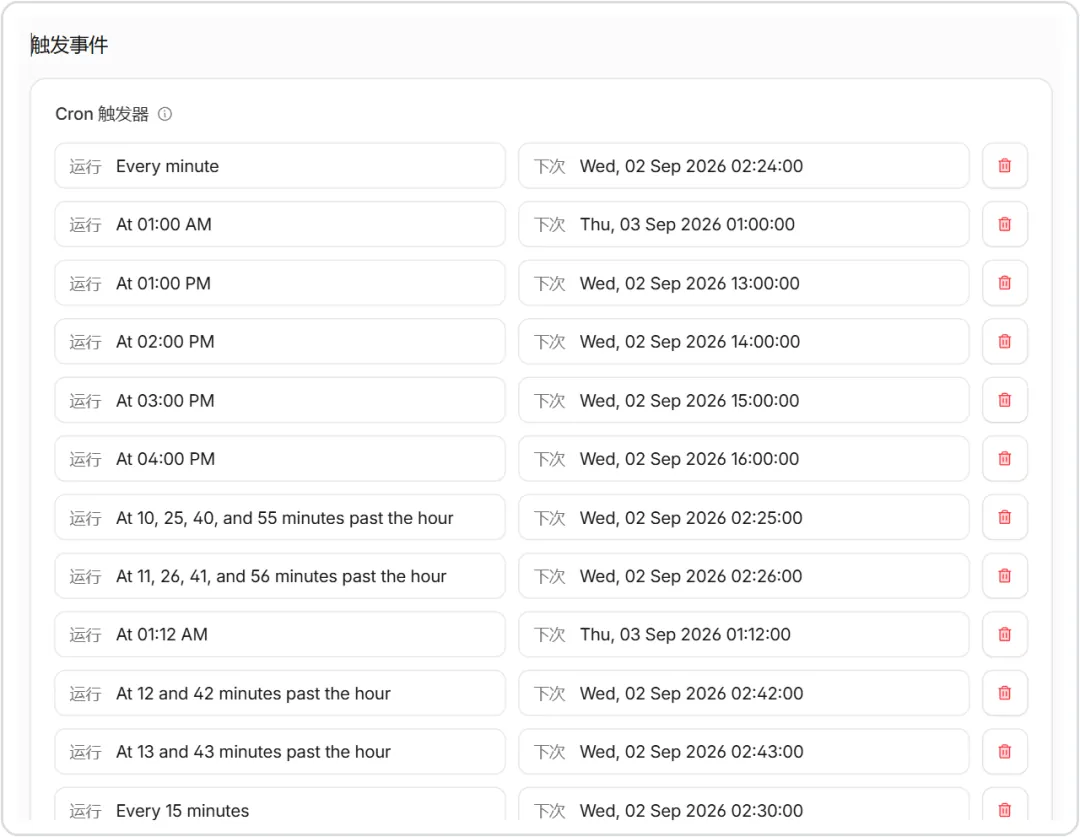
Polaris’s Cron triggers
The actual division of labor with the Agent:
I supply the idea. For example: for a zone whose conversion quality has dropped, the postback ratio should be pushed down automatically, but anything I’ve set by hand must not be touched.
The Agent supplies the plan. It reads the project first and lists an impact matrix: which files it will touch, which it explicitly won’t. Then it gives the minimal implementation, and I glance at whether the direction is right.
Verification on live data. After the change it runs its own tests, gets it working locally, deploys, then opens the dashboard with computer use to verify; I watch 24 hours of real postbacks.
The Agent is very capable, but it doesn’t know where it mustn’t touch. So there have to be prompts, with the rules written ahead of the task:
The money path, postbacks, amounts, click routing, cron jobs and database migrations are off-limits by default unless the task explicitly calls for it. An upstream failure must never turn into a fake success, and stale data must never be marked fresh. The user’s manual settings always take priority over AI automatic settings. Never write secrets, tokens or real account IDs into code, logs or screenshots. Changes go through a branch and a PR, and only after the tests pass is a release allowed.
The switch from Vercel to CF back then was done the same way.
My idea was not to rewrite first; the Agent’s plan was to write a compatibility adapter layer, run the old interfaces as they were inside the Worker, and swap them one by one for native implementations later.
The config file looks like this: one file binds the database, cache, locks and cron jobs all together:
Cloudflare has prepared a Workers-specific prompt for AI, at developers.cloudflare.com/workers/get-started/prompting; copy it into your project’s CLAUDE.md.
Then add docs.mcp.cloudflare.com/mcp to CC’s MCP, and it looks up the latest docs on its own while writing code.
Then say what you want in plain language. It builds, it tests, it deploys, and you look at the results.
Polaris has one extra gate: no bare deploy allowed, with 11 checks chained in front of it. That’s only needed once the system starts handling money.
06 My view
Boundaries first.
D1 is enough as a ledger, not enough for heavy reporting. For aggregations over millions of rows, I set up a separate VPS with ClickHouse and sync to it on a schedule.
Workers can’t run long-lived processes, and memory is 128 MB. Running a browser or heavy computation is a job for Containers, billed separately.
The free tier gives 10 milliseconds of CPU per request, enough for testing; for real business go straight to the $5 plan and save yourself hitting the limit in the middle of the night.
It used to be that after writing a script, you still had to think about the server, the domain, process supervision and logs. Now the Agent writes it, deploys, and the URL is in hand. $5 a month is enough to run several sets of optimization tools.
The AI era isn’t short of technology; what’s scarce is ideas and the speed of validating them. Idea, plan, live data speaking for itself: with those three together, $5 is your laboratory.
New articles and quick notes from Peter.