 Peter Founder
Claude Cowork: My First Digital Employee Does My Company's Books

Since last year, the idea of the one-person company (OPC) has suddenly taken off.
I wrote it in my year-end review at the time too: I think 2026 will be the year one-person companies break out in force.
Since February this year, many places have also started encouraging OPC founders: one person, with the help of AI and automation tools, carrying the entire operation of a company.
Honestly, I’m used to this state, and I feel calm about it. Because I’ve been doing it for 7 years.
From freelancer to one-person company
I started doing Affiliate Marketing full-time in 2019; this year is my 7th.
No partners, no employees. Every step, picking offers, building landing pages, buying traffic, tracking, optimizing, reconciling the accounts, I do all of it alone.
That’s nothing unusual; most freelancers work this way. The essence of a one-person company isn’t that one person is amazing, it’s that one person has to spend limited energy where it counts most.
Before AI came along, there were many things I couldn’t do, or had to give up. Now, as long as the idea can come out, it can get done. For example, using Claude Cowork to handle my Hong Kong company’s bookkeeping reconciliation.

What is Claude Cowork?
A quick introduction first.
Many people know Claude can chat and that Claude Code can write code. But Anthropic has another product called Claude Cowork: a digital employee on your desktop.
It’s different from an ordinary chat window. Cowork can work directly on the files on your computer: reading PDFs, parsing Excel, creating folders, editing spreadsheets, generating reports. You don’t upload and download files one by one; it works right in your local environment.
In other words, it’s not a Q&A chatbot. It’s like you hired an intern whose job is to organize reports. Come to think of it, organizing spreadsheets was what I did when I first started working; it left a deep impression.
Hands-on: how Cowork and I worked together
Here’s the actual process, using my Hong Kong company’s reconciliation statements as the job I gave it.
Step 1: Cowork scans my file structure on its own
I opened Cowork, pointed it at my Hong Kong company folder, and said:
These are some files for my Hong Kong company. I’ve already split them into 2025 and 2026, but I’ve only done a small part. Mainly payment proofs for traffic source top-ups, tracker and server costs, and my own monthly salary. Do you think this is organized properly?
Cowork didn’t reply right away.
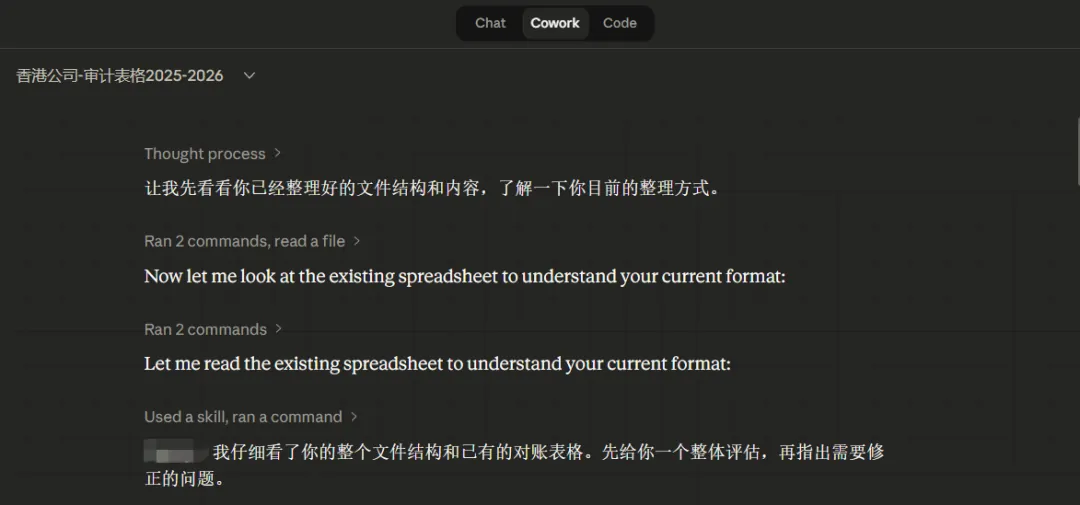
It first ran a series of operations on its own: reading the folder directory structure, opening my existing xlsx reconciliation sheet, scanning the contents and formulas of every sheet.
A few seconds later, it gave me a complete assessment.
Step 2: It found errors in my spreadsheet, which I didn’t expect
Cowork checked the 30 transactions I had entered by hand, line by line, and found several problems:
Data entry errors:
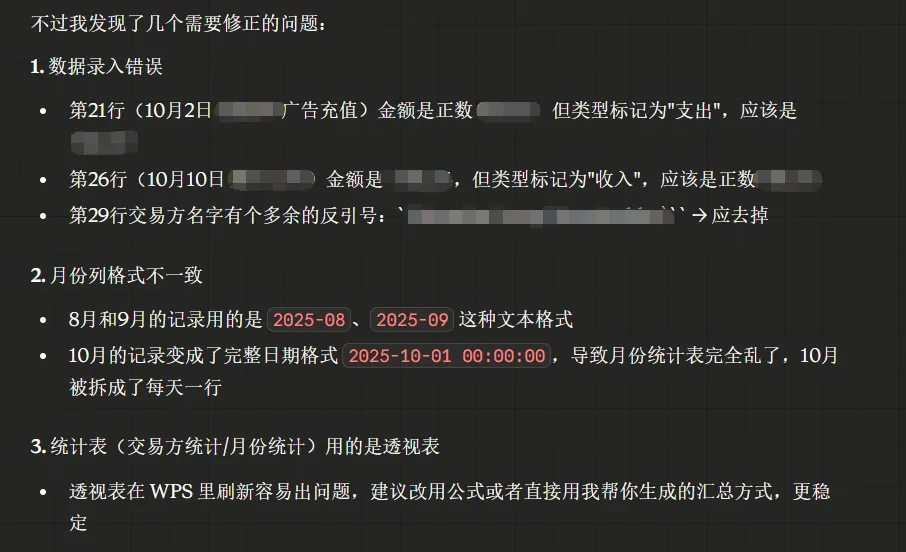
Honestly, I had looked over these several times myself and never spotted them. Especially that bug in the month formula; without a line-by-line check there’s no way you’d notice it.
Step 3: Automatic fixes and rebuilt summary sheets
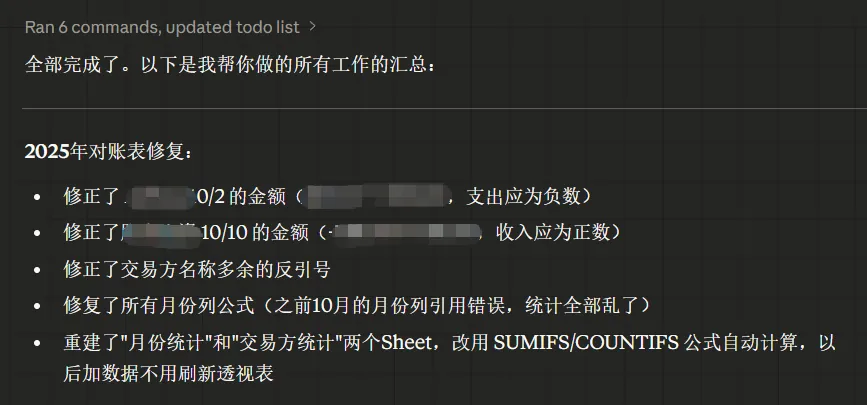
Once I confirmed the problems, Cowork made all the fixes in one go:
Corrected 3 entries where the amount had the wrong sign
Fixed the formulas in all the month columns
Deleted the old pivot table and rebuilt the two sheets, “Monthly Summary” and “Counterparty Summary”, with SUMIFS/COUNTIFS formulas
Unified every date format to yyyy-mm-dd
I didn’t lift a finger through the whole fix. When it was done, I opened the spreadsheet and the summary numbers finally matched.
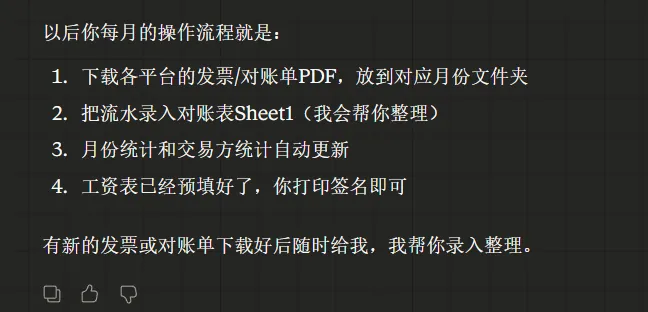
Step 4: Creating the full set of 2026 files
For my 2026 data, Cowork went ahead and did it for me:
Created a new 2026 reconciliation sheet with exactly the same structure as 2025
Pre-filled the salary entries for January to March
Generated 12 months of payslips based on the payslip template I had received earlier
Completed the folder structure for the months of 2026 so far: Invoice for January to March, Statements for every month
Step 5: Checking every invoice one by one
This step is the most hardcore.
Cowork doesn’t just look at the spreadsheet data. It went and read the actual content of every invoice PDF in the folder and compared them one by one against the records in the reconciliation sheet.
A check at this level would take me at least half a day if I did it myself.
Step 6: Checking for gaps against the audit requirements
Finally I sent Cowork the list of audit materials my corporate services agent had given me, and had it check against that.
It listed the current status item by item:
Bank monthly statements: the audit wants the full statement for every month
Sales and purchase receipts: it also reminded me that affiliate commission payout statements should go in too, since the audit needs to see proof of income.
Other expense receipts: the Meta Ads PDFs are there but weren’t entered in the reconciliation sheet, and 2025 is missing the receipts for the company registration fee and the secretary company’s annual fee.
In the end Cowork gave me a clear to-do list, marking which items are essential must-haves and which are recommended additions.
A few things I learned from this collaboration
1. AI doesn’t just do the work for you, it checks it
Fixing spreadsheets and creating folders are the basics.
The real value is that it can check your data line by line and find the places where you’re prone to error: an amount with the wrong sign, an invoice number with one digit too many, a payment account labeled wrong.
If these details make it to the auditor, at best you’re submitting extra materials, at worst it affects the report.
2. Give it a clear structure and the quality of its output doubles
When I first organized things, the folder structure was actually decent: split by type into Applications, Contracts, Invoice and Statements, with Invoice broken into subfolders by month.
The first thing Cowork said was what I had done well so far, and then it optimized on top of that.
If I hadn’t even had a basic structure and had just dumped a pile of messy files on it, the result would definitely have been much worse.
3. Use it as an employee, not as a tool
My conversation with Cowork felt like talking to a newly hired finance assistant.
It asked me: how much is the monthly salary? Which month did it start? Then it executed according to my specific situation.
This way of interacting is far more natural than learning a complicated piece of accounting software.
What a one-person company really means
Back to the one-person company I mentioned at the start.
Many people understand the concept as: one person does everything.
The core of a one-person company: decision-making is concentrated in one person’s hands, but execution can be distributed.
In the past, distributing execution meant outsourcing to people: a part-time accountant, an assistant. Now, AI tools are taking over part of that. Claude Code writes automation scripts and manages ad API integrations; Claude Cowork handles file organization; OpenClaw takes care of intelligence gathering, on a cron schedule.
They’re not all-powerful. Cowork can’t go to the bank and download the statements for you, and it can’t decide for you whether to pay yourself a salary.
But it can take the dozens of files you downloaded and, within 30 minutes, turn them into a complete package the auditor can use directly.
The things that need judgment, which offer to run, how to allocate budget, how to design the company structure, are still on you.
What AI replaces isn’t your judgment, it’s your manual labor.
Final words
30 minutes to finish the reconciliation work that used to take a whole day in previous years.
And not just finished, but at a higher quality than when I did it myself: it found the errors I’d missed, unified the formats, rebuilt more robust summary formulas, and checked for gaps against the audit checklist.
If you’re also running a one-person company, or any business that needs its financial files organized regularly, give Claude Cowork a try.
No need to wait until the auditor is chasing you to start scrambling.
New articles and quick notes from Peter.